一、在 POPCUSTOMS 创建一个亚马逊店铺,便于后期管理
二、下载 POPCUSTOMS 提供的图片蒙版并应用到定制计划商品
三、将定制计划的订单导入到 POPCUSTOMS
一、在 POPCUSTOMS 创建一个亚马逊店铺,便于后期管理
二、下载 POPCUSTOMS 提供的图片蒙版并应用到定制计划商品
三、将定制计划的订单导入到 POPCUSTOMS
Please take some time to read this article if your store is not Shopify/ Etsy/ WooCommerce/ BigCommerce/ Wix/ Amazon, and can’t integrate into POPCUSTOMS but you want to sell with us.
Step 1: Create a POPStandard store
Step 2: Export order template & designs from POPCUSTOMS
Step 3: Import designs to your store
Step 4: Export orders from your store
Step 5: Fill in order info to our order template and import it to POPCUSTOMS
Step 1: Create a POPStandard store
Create a custom POPStandard store on POPCUSTOMS.
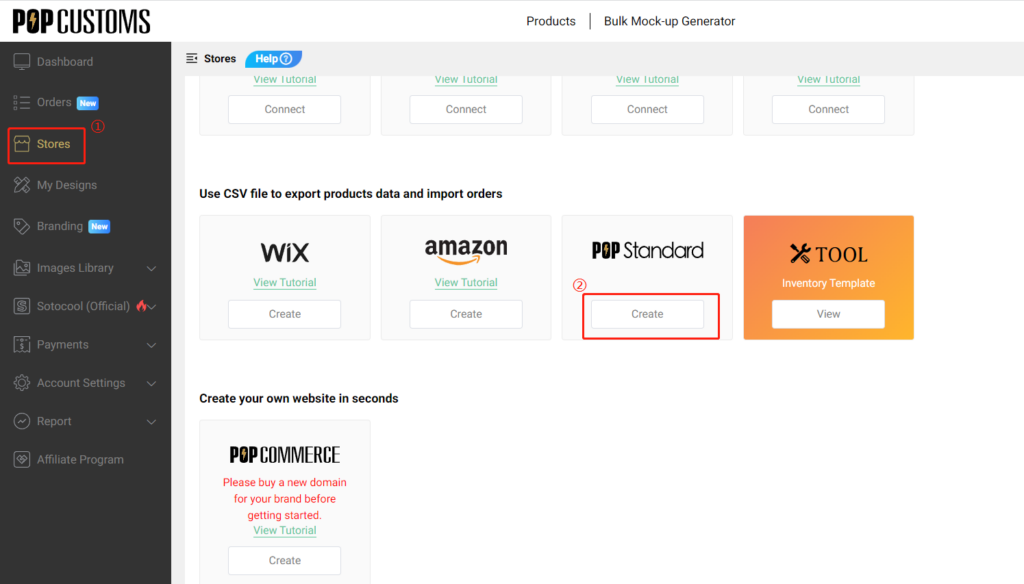
Step 2: Export designs & order template from POPCUSTOMS
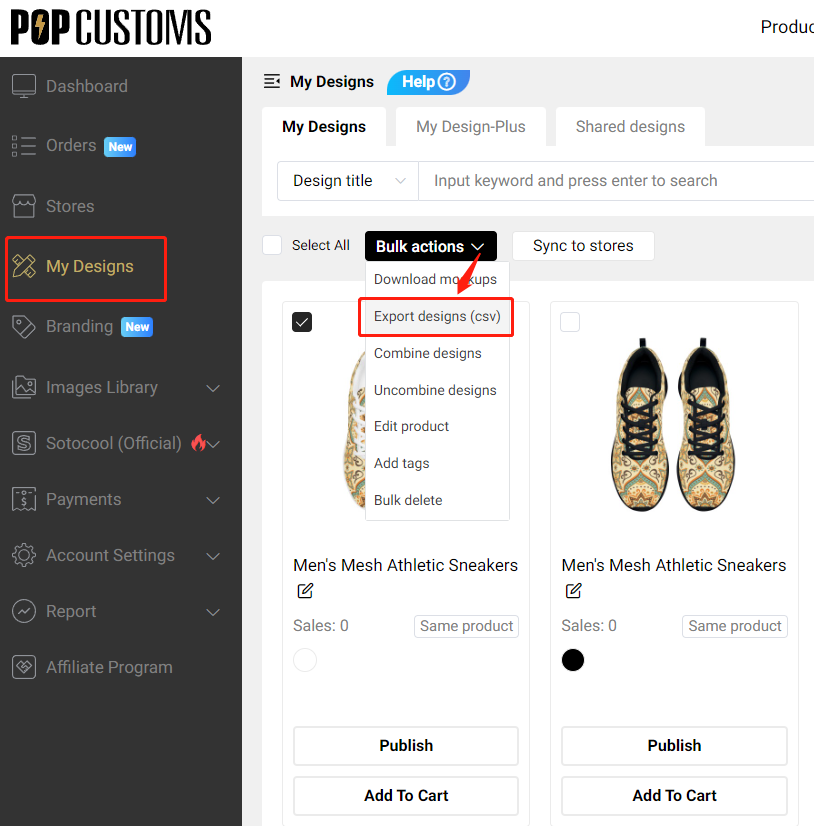
Go to Dashboard -> My Designs to find the designs that you want to sync to your store. Select the product and click Bulk actions -> Export designs.
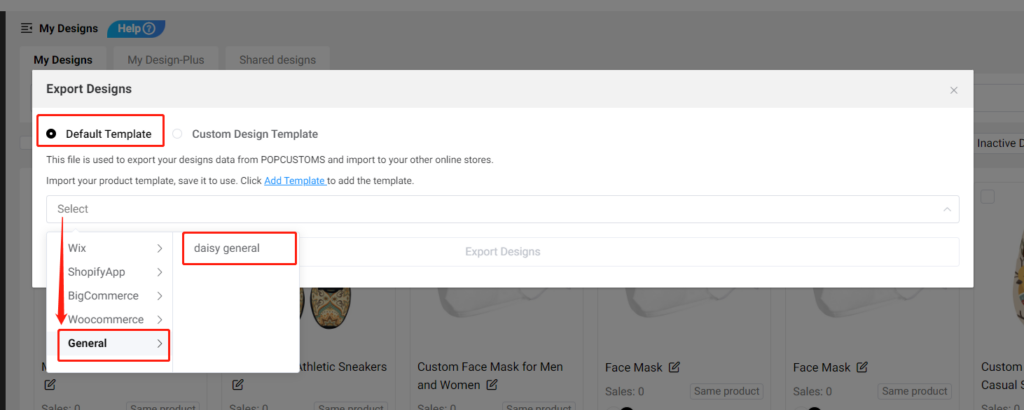
Then choose Default Template -> General to select the custom store that you created in Step 1 to export designs.
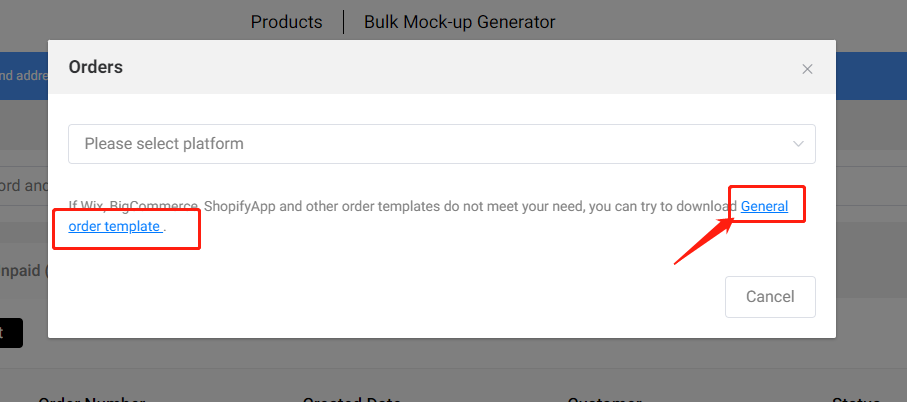
At the same time, please
For technical reasons, Etsy won’t notify popcustoms.com of new orders therefore we’ll have to pull the orders on a regular interval.
We choose 1 hour as the interval and we might reduce the interval in the future.
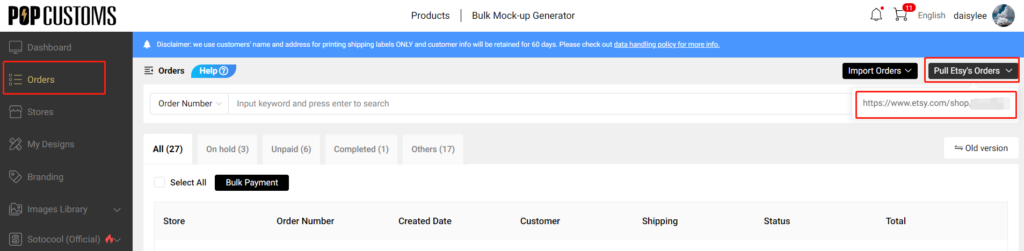
If you want to pull orders immediately, please go to Dashboard -> Orders to pull the order manually right away.
Hi, Customsers & Artists!
As of now you will find our new collection “Cycling Jerseys “Clothing and new styles of Hats / Jewelry / Shoes /Bags in Popcustoms —–New Products to growing your ecommercr business , check more :
1: Hats & Caps (Printing & Embroidered )
Check out : https://popcustoms.com/products/all-hats-caps?page=1&limit=24&basic_category_id=214
2: Jewelry (Rings & Bracelets & Necklaces )
Check out : https://popcustoms.com/products/all-jewelry-accessories?page=1&limit=24&basic_category_id=276
3: Men’s Pro Team Jersey &Training Tights and A Suit Collection
Check out : hthttps://popcustoms.com/products/sport-wear-products?page=1&limit=24&basic_category_id=189
4: Shoes & Bags in 30% OFF promotion for MOther’s Day
Check out : https://popcustoms.com/products?page=1&limit=24&promotion_ids%5B%5D=3&sort=promotion_sort&direction=asc
Enjoy !And keep in touch !
Business@popcustoms.com

Are you looking for a new Print-on Demand supplier to fulfill your existing business, because:
Take a moment to get to know us, we can be your loyal and awesome partner!
Transfer order to be fulfilled by POPCUSTOMS,
Let’s take Etsy order as an example to record a video tutorial to show you how to make it step by step.
Firstly, please make sure you have connected your store with POPCUSTOMS.
If you have problems with the connection, please refer to our Integration Tutorial
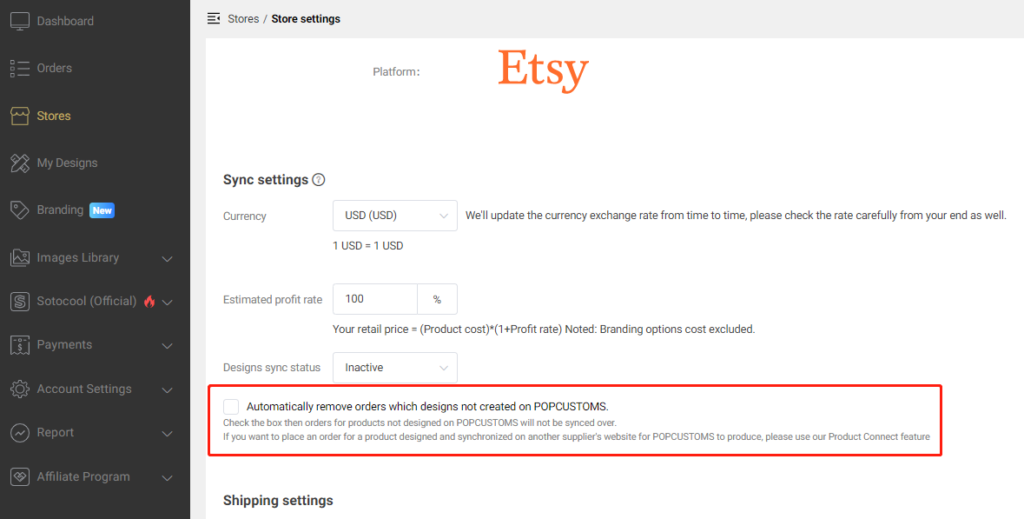
STEP 1 – Click “go to dashboard” to open “Stores” page , click “settings” of the store, remove the tick – “Automatically remove orders which designs not created on POPCUSTOMS”, and click “Confirm” to save change. https://popcustoms.com/stores/
STEP 2 – Click “Orders” to Open “On hold” page, find the order needs to be connected.
STEP 3 – Click “Connect this design” – “Products” – search for the corresponding product, select attributes customer ordered and click “Connect and design”. Then, upload your images to design the product, click “Connect and design” on the top right to save. If you have already created this design before on POPCUSTOMS, please click “My designs” to select it.

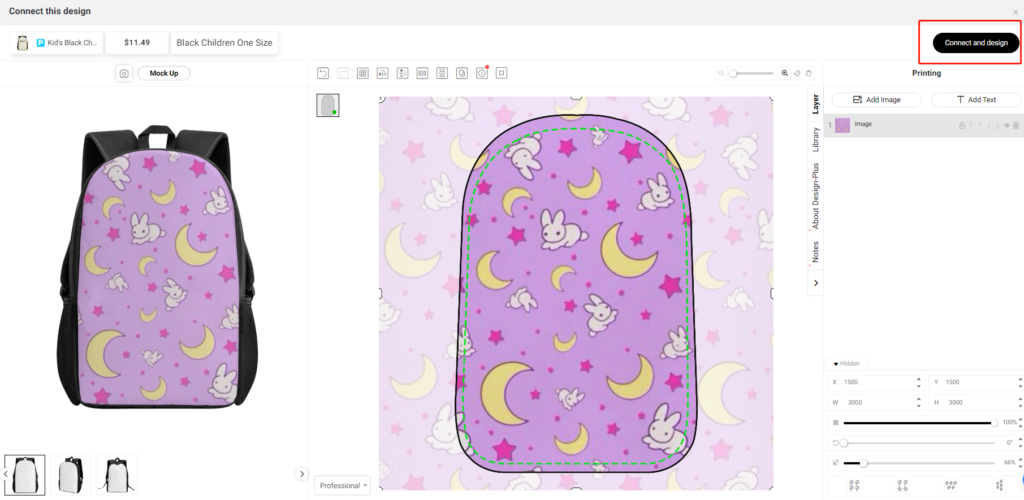
△NOTE ①: The attributes cannot be changed after you designed, so please make sure you select the correct one before click “Connect and design”.
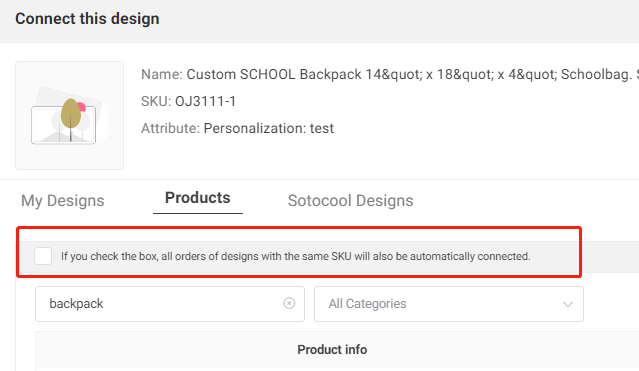
△NOTE ②: About “If you check the box, all orders of designs with the same SKU will also be automatically connected.” Let’s take an example to understand this rule: You receive an order with “14 inch School Backpack”, you created the design on POPCUSTOMS and it is assigned to an exclusive POPCUSTOMS SKU “7W0QQK2W-1”. Next time, if you receive another order with “14 inch School Backpack”, we will automatically connect this order with your finished design, so you will see it on “On hold” page, you just need to submit and pay.
STEP 4 – Check the product attributes again and click “Confirm connection” to select shipping method and pay the order.


That’s all. Interested in learning more? Contact us now!
Please note that you can use our live shipping rate for POPCUSTOMS products in your WooCommerce store. Let’s guide you to set up the shipping in the following instruction.
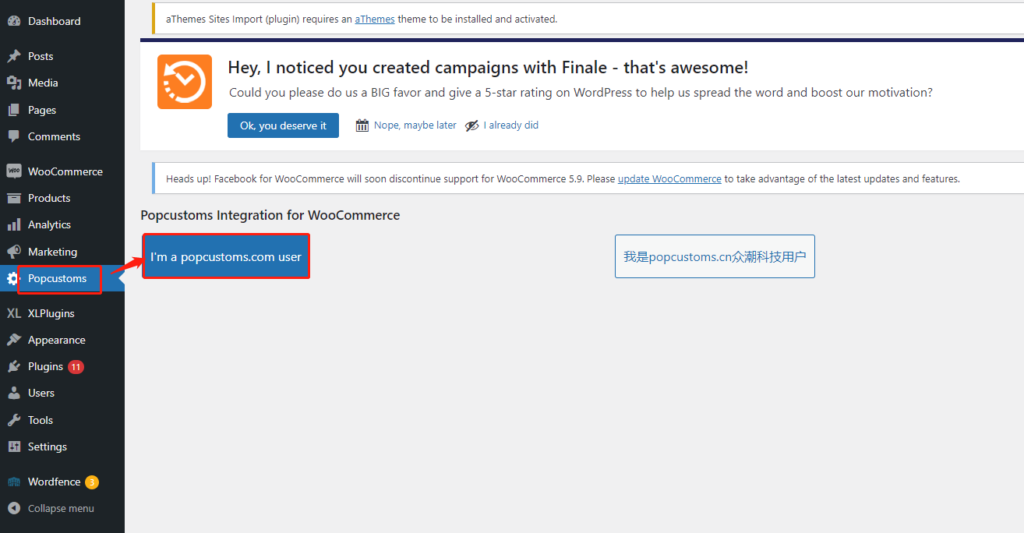
First of all, find the POPCUSTOMS in your WooCommerce Dashboard and click the button I’m a popcustoms.com user.
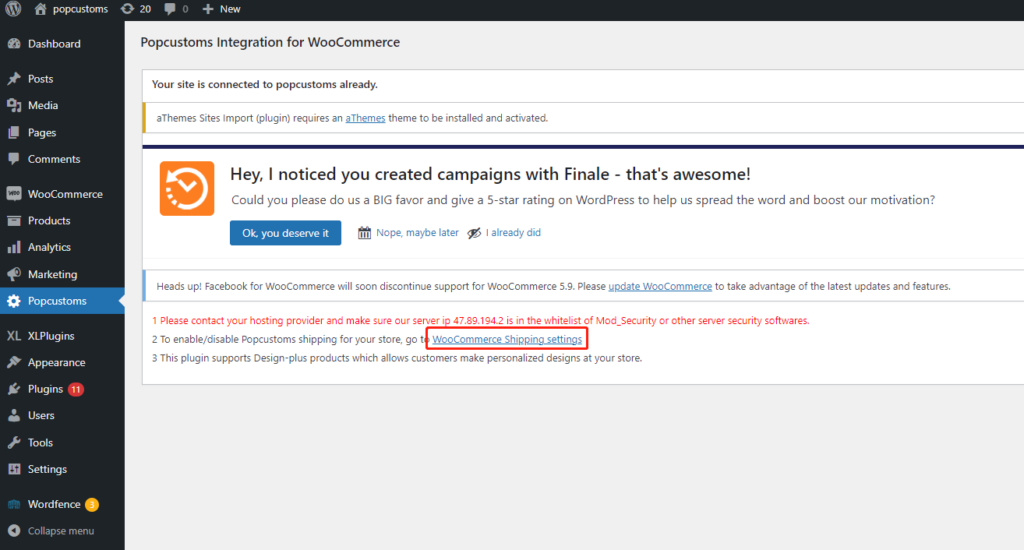
Then click WooCommerce Shipping Settings on this new page.
Make sure that all these three boxes are checked. And you can fill in a Shipping Fee Ratio to exchange the shipping fees from USD to other currencies you used in your store.
*For example, you use EUR currency, and the currency rate between USD and EUR is
1USD=0.93EUR
Then, you should fill in 0.93 in the Shipping Fee Ratio to make sure the shipping fee is correct in your store.
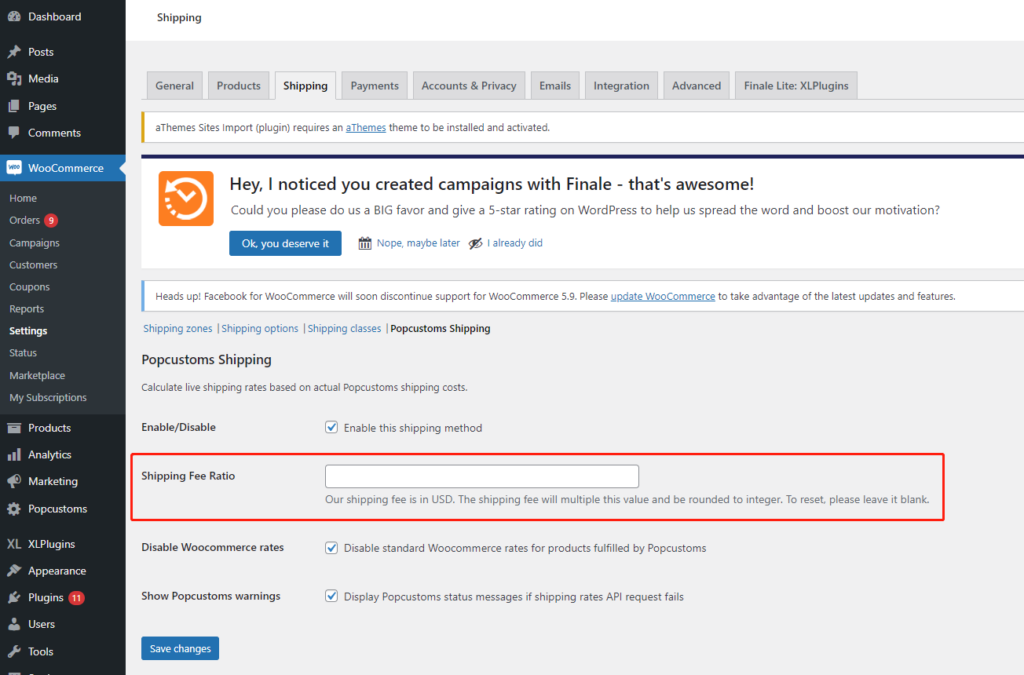
Finally, click the Save changes button to save it.
Something important to know:
We charge VAT for 27 EU countries, LU/MT/CY/DE/RO/AT/BG/EE/FR/SK/BE/CZ/LV/LT/NL/ES/IT/SI/IE/PL/PT/FI/GR/HR/DK/SE/HU. The
T/CY/DE/RO/AT/BG/EE/FR/SK/BE/CZ/LV/LT/NL/ES/IT/SI/IE/PL/PT/FI/GR/HR/DK/SE/HU. The
HU. The VAT is charged on the basis of the product’s retail price, and it is not listed individually but is included in the shipping fees in WooCommerce. In other words, the higher the retail price you set, the higher the shipping fees (VAT included) the customer should pay.
Store your products and branding options in our warehouse to save fulfillment time for your drop shipping orders in peak season.
一. Create Warehouse Order
Head to Dashboard -> Warehouse -> Warehouse Orders -> Create Warehouse Order to place your warehouse order.
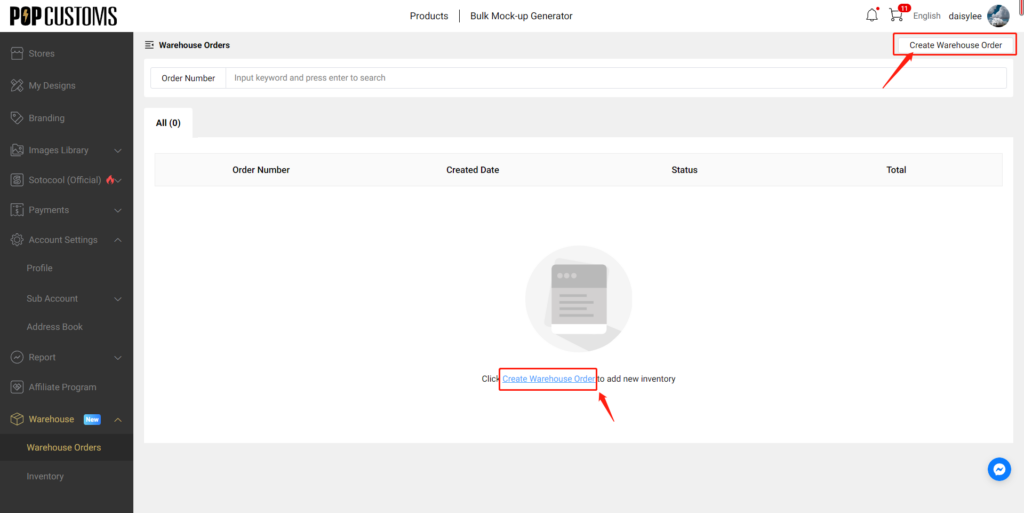
二. Choose Designs & Add to Warehouse Shopping Cart
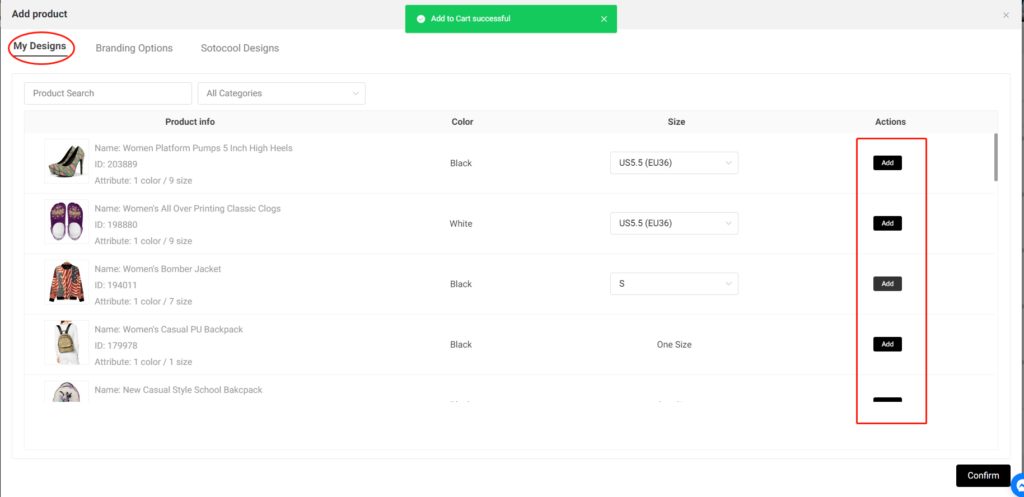
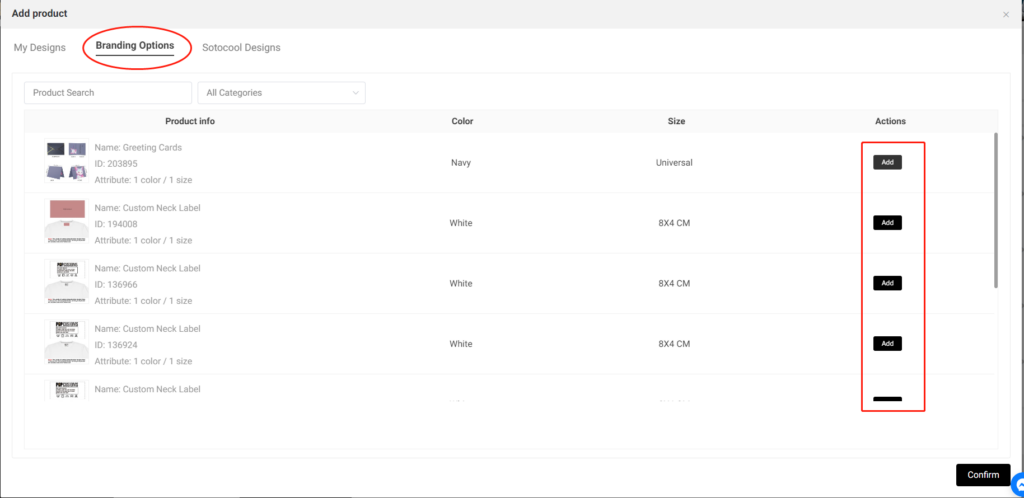
Add your designs, branding options, or Sotocool designs to the warehouse shopping cart.
三. Place Warehouse Order
Click the Confirm button, you’ll be driven to the shopping cart details page. You can increase or decrease the quantity of the designs that you selected, delete, or add designs to the shopping cart.
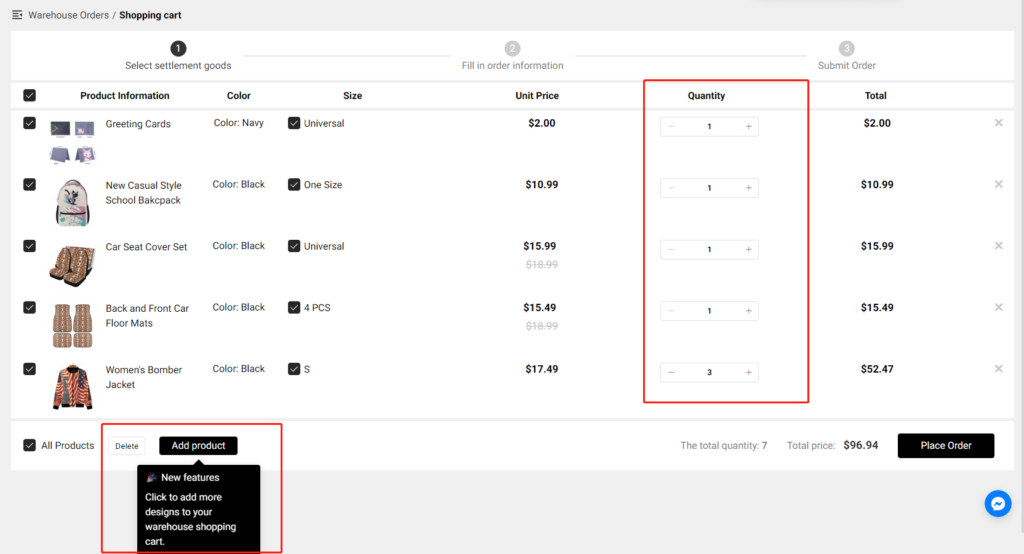
Once you confirm everything, you can place your warehouse order.
Click here to place your first warehouse order now!
Something important to know:
① Since we can’t know the quantity and the types of your warehouse order, we can’t give an estimated fulfillment time for your reference. However, you’ll get an email once we complete it.
② When you place a regular order and the items in this order are stored in our warehouse, we’ll ship the items from your inventory and deduct the cost of the items from the current payment.
Currently, we can’t integrate into Amazon stores, but you can export your design info including images and descriptions from our website, fill them in your Amazon product template, and import them to Amazon.
Step 1: Create a custom store
Step 2: Download Product Template from Amazon
Step 3: Export designs from POPCUSTOMS
Step 4: Fill in Amazon Product Template & Upload
To sync products and place orders manually, create a custom store.
Step 1: Create a custom store
Click the Create button under Amazon to create an Amazon store, and name the store as needed. This store will be used when you import your Amazon orders.


Step 2: Download Product Template from Amazon
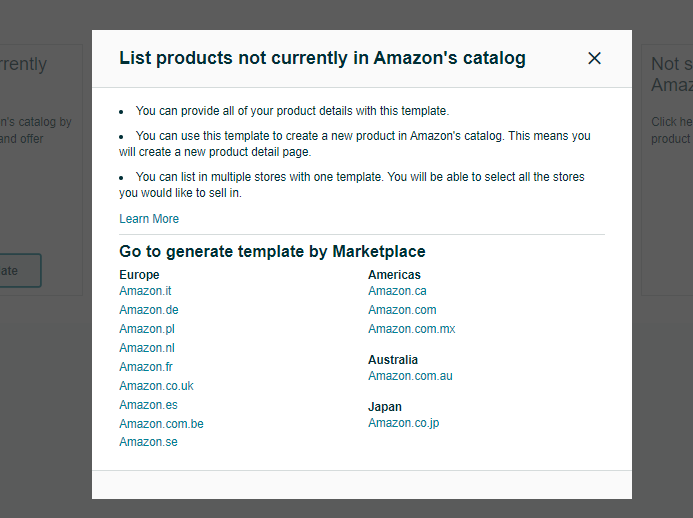
Go to your Amazon seller central to generate and download the product template you need.
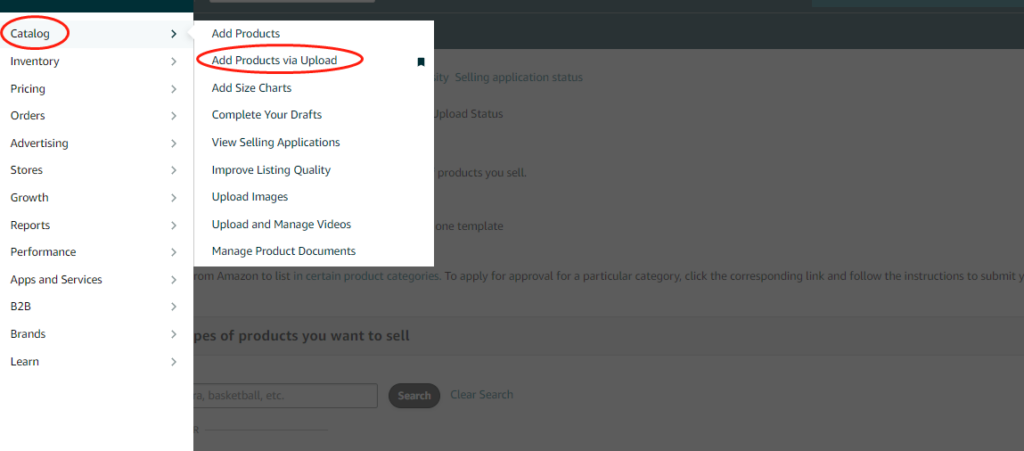
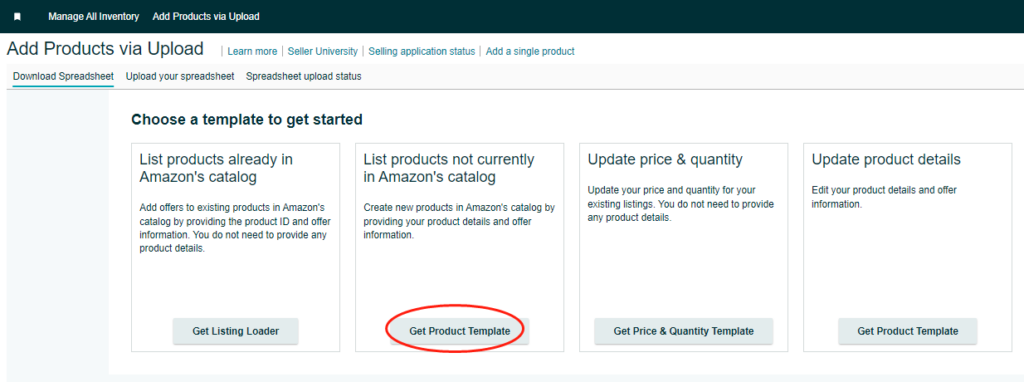
Choose the marketplace of your Amazon store.
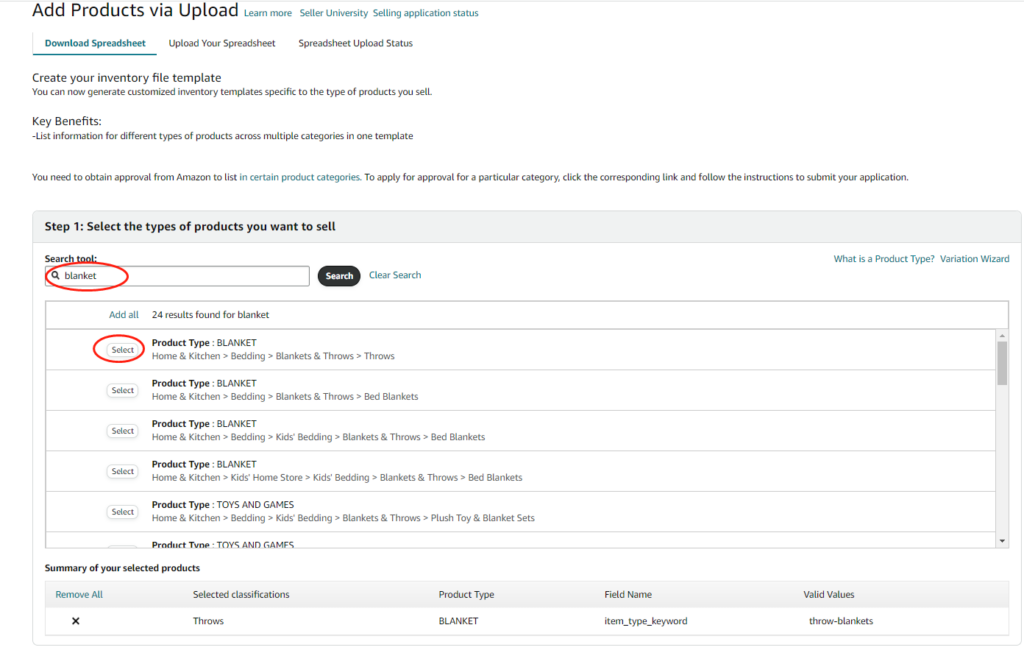
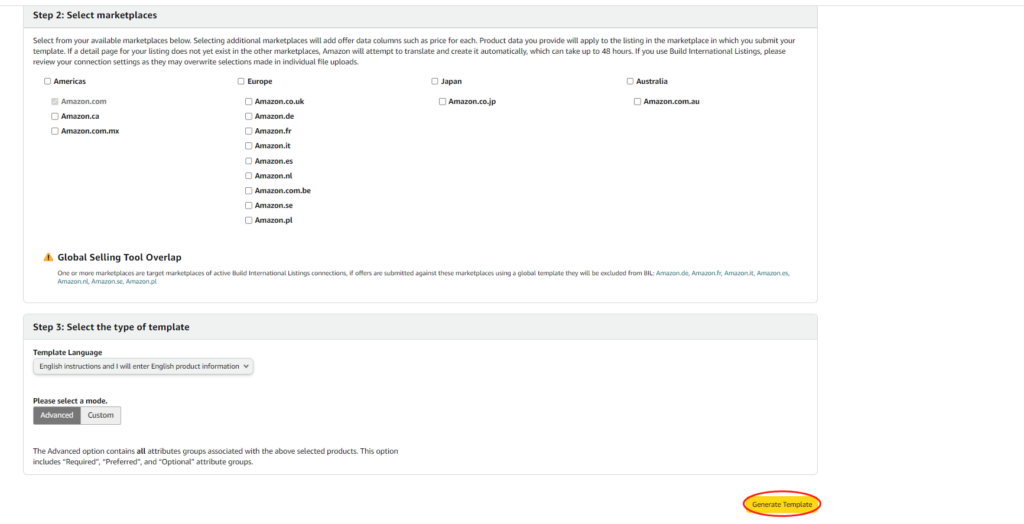
This product template file should be saved for use later.
Step 3: Export designs from POPCUSTOMS
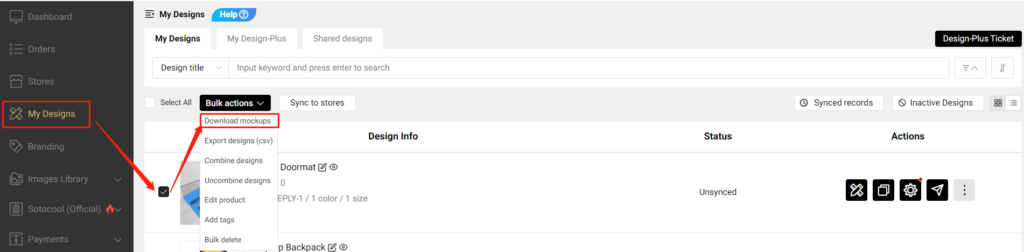
After completing your designs, you can go to Dashboard -> My Designs to find and select them, and click Bulk actions -> Download mockups to download product data.

Step 4: Fill in Amazon Product Template & Upload
Copy descriptions, images, and SKUs from the downloaded product data file at POPCUSTOMS and paste them to the product template downloaded from Amazon.


*Since we use SKUs to match products when producing, we suggest you use our SKUs and don’t make any changes.
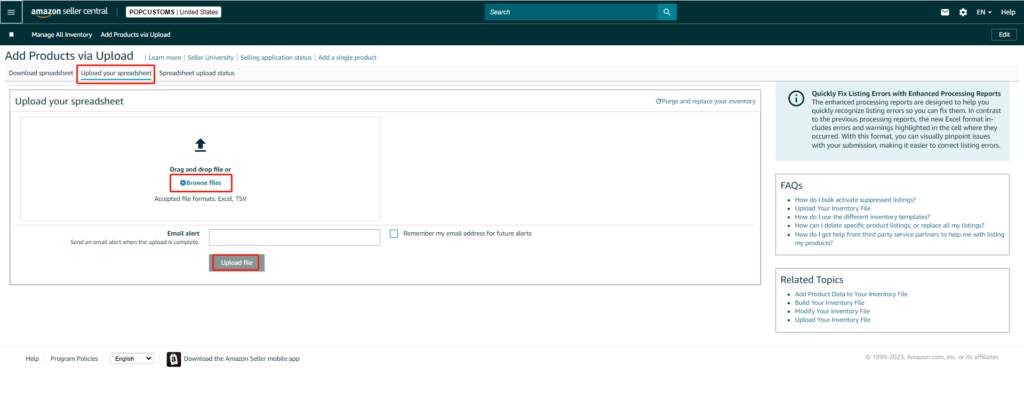
Finally, upload the product template to Amazon
That’s all!
*Click here to learn how to import your Amazon orders to us for fulfillment.
Hi, Customsers & Artists!
We take care of everything with dropshipping in 2-7days to your customers all around the world . But now some products are running out of materials on Popcustoms. Please note and check the below details , then inform your customers /friends sto stop selling or remove these products.
If we have purchased new and good materials and put them on the shelves again, we will notify you immediately:
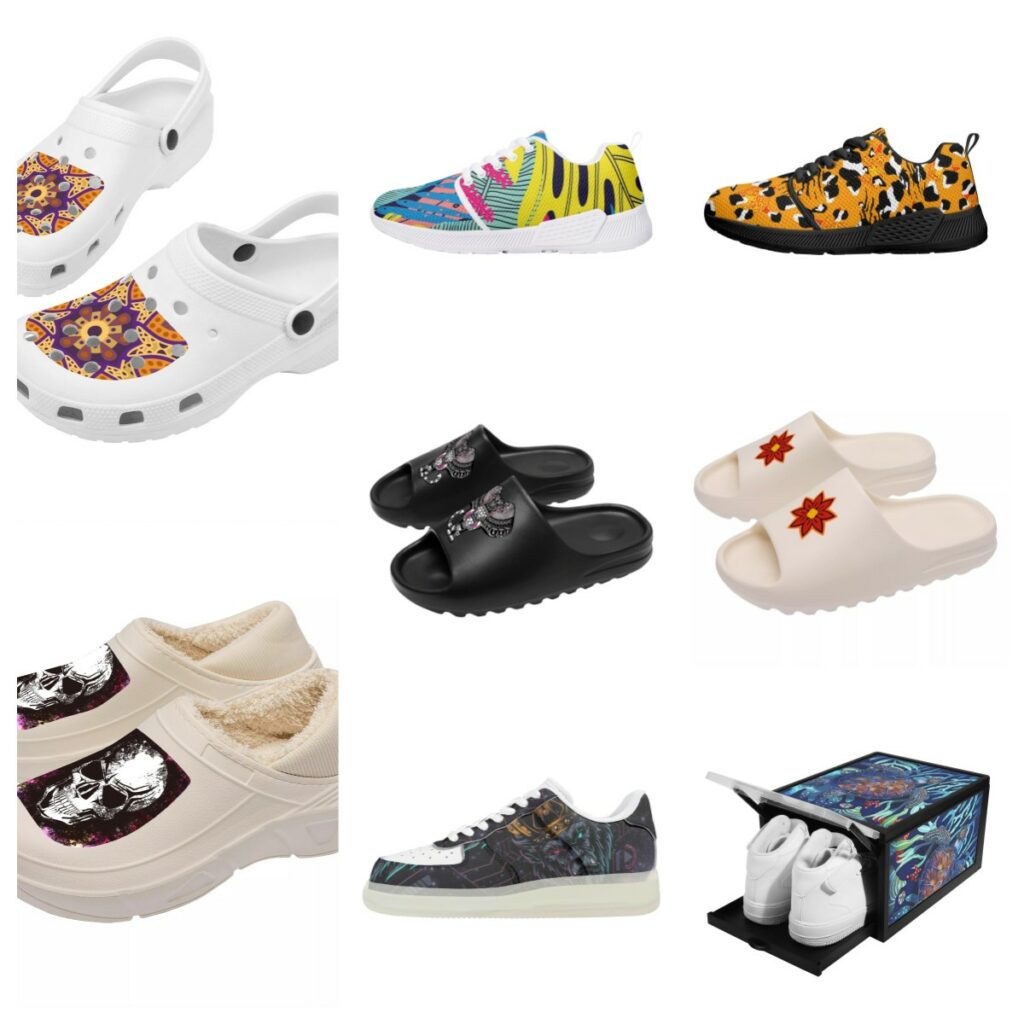
1: SKU Code: SF_S44 : Women’s /Men’s Classic Crocs Clogs
2: SKU Code: SF_S45 : Women’s /Men’s Warm Cotton Slippers
3: SKU Code: D21 : Women’s /Men’s Athletic Running Shoes
4: SKU Code: SF_S46 & SF_S46B: Women’s /Men’s Black Platform Summer Sandals & Soft Platform Slide Sandals
5: SKU Code: SF_S42 : Women’s /Men’s Transparent Low Top Leather Shoes
6: SKU Code: LU3 : 3-sided Printing Shoe Box
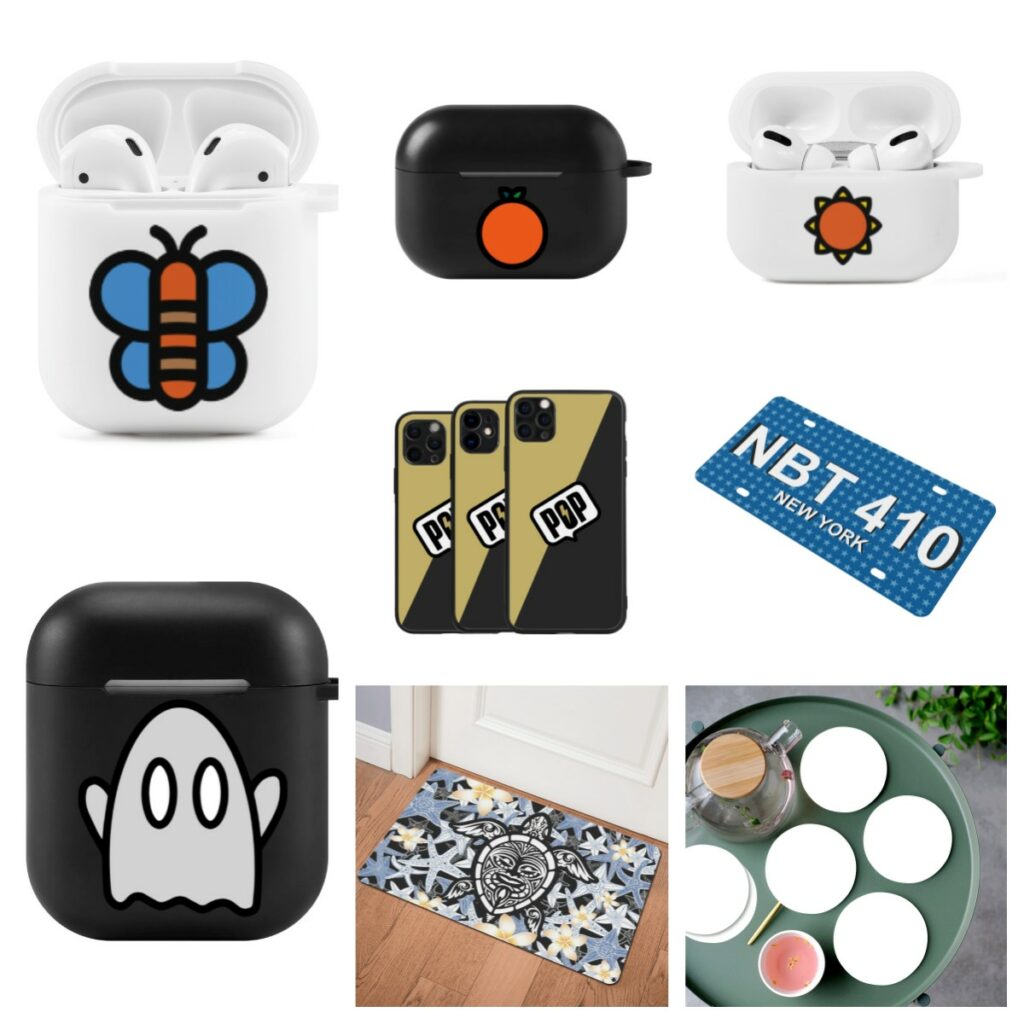
7: SKU Code: ML_1_W & ML_1_B : White & Black AirPods Case Cover
8: SKU Code: ML_PRO_W &ML_PRO_B : Fashion White & Black AirPods Case Cover
9: SKU Code: LU3 : iPhone11 Series Phone Cases
10: SKU Code: MR : Customized License Plates
11: SKU Code: U: Rubber Door Mat
12: SKU Code: D49 : 6 Pieces Cup Mats Set
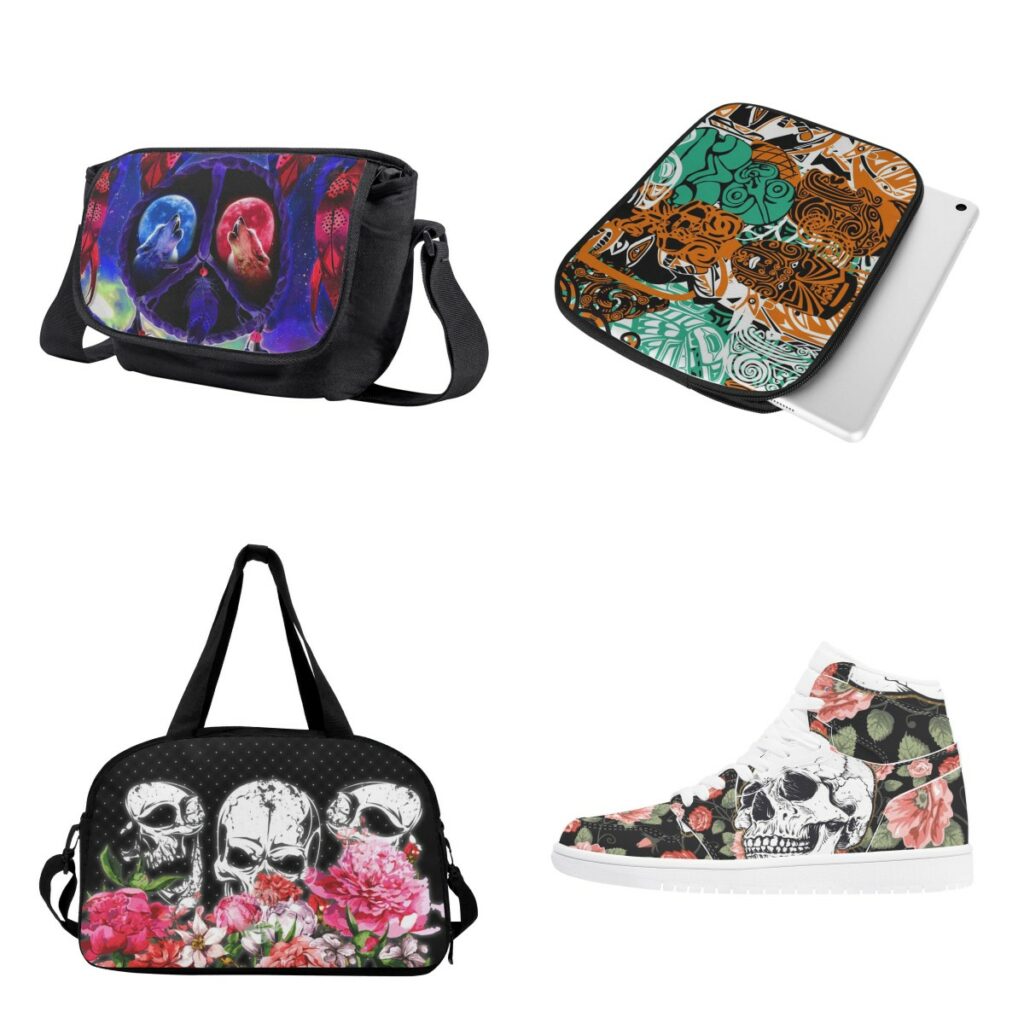
13:SKU Code:D32:Messenger Bag
14:SKU Code:H:Ipad Sleeve
15:SKU Code:T:Travel Luggage Bag
16:SKU Code:D17:Men’s High Top Skateboard Sneakers—Cancelled bigger size US12-13-14 (EU46-47-48)
17:SKU Code: D30:Men’s Slide Sandals Shoes—-Cancelled bigger size US13 (EU47) & Updated New sizes for Kid’s Slide Sandals Shoes
Please check and confirm !Thank you so much !
business@popcustoms.com