If you has one product listing published in your Etsy store front, and you would like to add different designs options of the same product to this existing listing, please follow the steps below,
Step 1: Create products
Step 2: Sync to Etsy in draft
Step 3: Create the option on Etsy
Step 4: Add the SKUs and change
Step 1: Create products
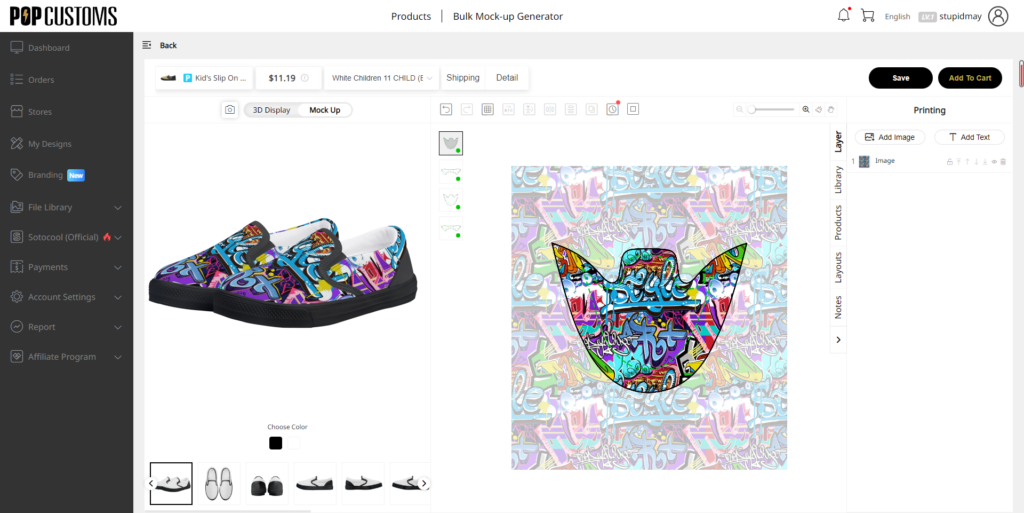
Create the product in POPCUSTOMS.
Step 2: Sync to Etsy in draft
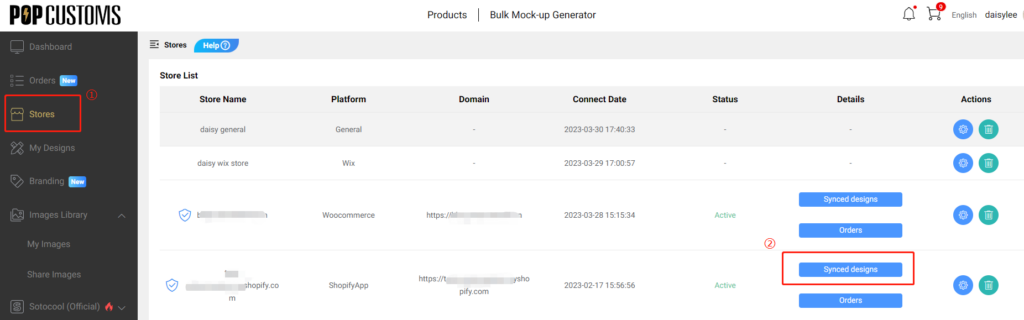
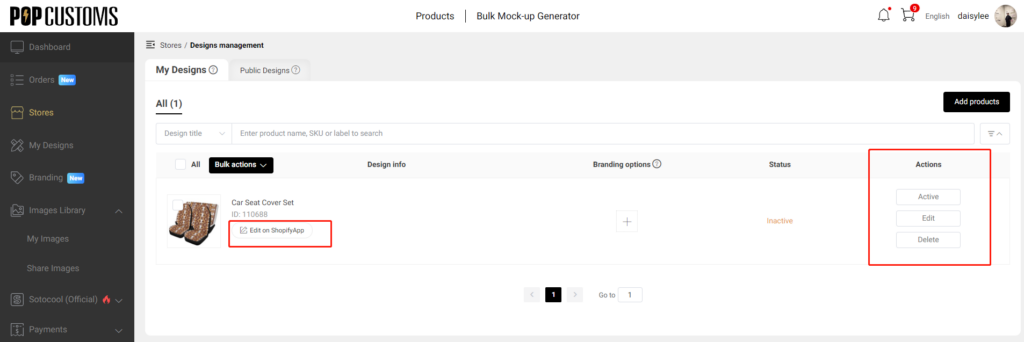
Sync it to Etsy in the draft / not publish. But make sure that this product is in Active status in your POPCUSTOMS account. Go to Dashboard >Stores to find your connected Etsy store, click the content under Synced designs to find the product, and change the status to active.
Step 3: Create the option on Etsy
Create the option on Etsy. Let’s suppose you have an existing product listing A, you would like to add product B’s design options to A’s listing. Go to your Etsy store, find product A and click the title of the product.
Scroll down to find the Variations of Product A and click Edit variations, name the option, and click the Add button. Don’t forget to click the Update button when you add all options you need.
Step 4: Add the SKUs
Click the product B, click the title link of the product to find the SKUs. Copy and paste the SKU to the option as needed.
Because of orders increasing sharply in this peak season and the cost has increased, then we’re keeping the best quality, so we decisions start on 11.24 there:
1: We’ll restore the original price of the Pet Cover, no discount for the time being. (We’ll inform you if there is any discount for it again)
2: The production time of the Pet Cover will be adjusted to 8-10 business days that ensure normal production and best quality!
We apologize for any inconvenience may cause!
And please contact us by email or online messenger if you’re urgently and we’ll do adjustment for rush production.
Please adjust your settings and inform or explain to your clients.
Want POPCUSTOMS to produce your Amazon custom orders? You should,
Step 1: Create an Amazon store
Step 2: Upload the font file
Step 3: Download the order report from Amazon
Step 4: Modify SKU
Step 5: Import to POPCUSTOMS
Please follow the steps below to import your Amazon customs orders to POPCUSTOMS.
Step 1: Create an Amazon store
Create an Amazon store in POPCUSTOMS first. Name the store and click the confirm button to save it.
Step 2: Upload the font file
Go to your Amazon store, open the custom order and click Customization Information.
Click Download font.
Back to POPCUSTOMS, click Stores, find your Amazon store, then click the store settings button.
Click Upload font, select the font downloaded from Amazon custom order to upload. The same font only needs to be uploaded once.
Step 3: Download the order report on Amazon
Go to your Amazon store, Click Orders -> Order Reports button to download the order report.
Step 4: Modify SKU
*If you’ve used our website SKUs when setting up your Amazon products SKUs, then you can skip this step.
Open the downloaded order report in excel and find the SKU column. These SKUs have to be changed.
Go back to POPCUSTOMS, and click “My Designs” to find the designed product of your order. You can directly save blank design products, use the product SKU without design because you will import Amazon orders to POPCUSTOMS, we can extract Amazon customers’ custom information from the backend and process it for you.
Click the Attributes button to see the SKU of the product, copy the SKU to use.
*If the product has more than one size, different sizes will have different SKUs. Check the product and the size in your order, and find the correct SKU to avoid mistakes.
Paste and replace the corresponding SKUs into the SKU column of the Amazon order report you downloaded. Save this order report and change the format to .xlsx.
Note: If there are 2 products with the same sku in the same order-id, you need to add a suffix to the order-id to distinguish them, otherwise the system cannot recognize that there are 2 products. Take the following order as an example, you can add -1/-2 to the suffix of the order-id as a distinction, after the order is imported to POPCUSTOMS, then make a note of 113-3253820-8999466-1 and 113-3253820-8999466-2 ship together.
Step 5: Import to POPCUSTOMS
Back to the POPCUSTOMS Dashboard, click Orders, find Import Orders, and select Amazon Custom Orders to import your order report.
Here you should select the store first, choose the shipping of your orders and then upload the Amazon order report. Finally, click the Confirm button to import.
If you choose the shipping “Manually select for each order“, then these orders will be imported to the “On hold” status. You need to click Change Shipping to select the shipping method for each order.
Submit your orders and click confirm,
then your orders will be in “All” status. Select your orders and pay for them, and we will arrange to produce your orders right away.
Because of orders increasing sharply in this peak season ,and we’re keeping the best quality , so some orders will be delayed 2-3 days to ship out , please know & understand .
We apologize for any inconvenience this delays may cause , and please contact us by email or online messager if you’re urgently and we’ll do adjustment for rush production .
No price is ever displayed on your shipping label for orders that shipped via YunExpress, 4PX, J&T, YDH, or DHL. However, for orders that shipped via EMS, there’s a price shown on the outside of the package due to shipping regulations.
Regarding orders that shipped via FedEx to other countries except for the US, there’s no price shown on the shipping label. However, there’s an invoice attached due to shipping regulations.
Our Car Pet Seat Cover can be installed in 2 different ways. In this video, you’ll see the most casual way to use it. Of course, you can just hang one side of the pet seat cover.