Q: How to install the Sofa Protector?
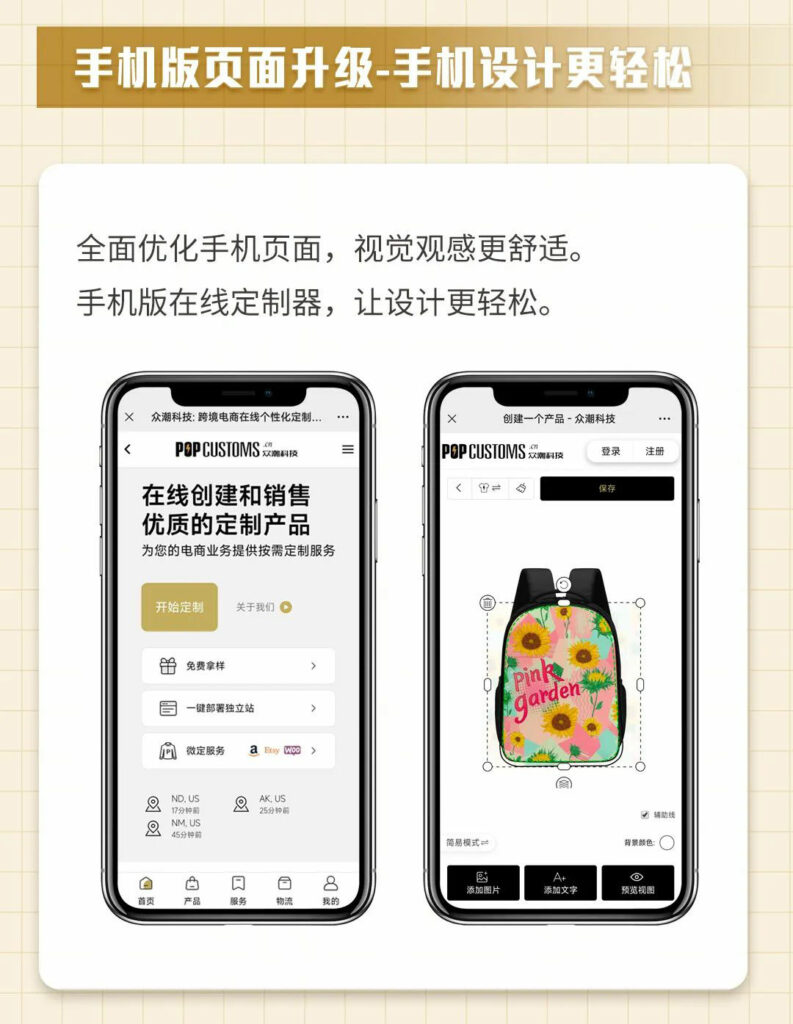
POPCUSTOMS 手机端设计器全面升级
Q: How to have my branding items and ship them with my orders?
Let’s show you how to add your branding items to your designs so that they can be shipped with your orders.
*The branding items will not sync to your store as commodities so you should set your retail price of products higher enough to include the branding materials costs. However, the mock-ups of the branding items will be shown on your storefront if you use the Publish button to sync products.
Step 1: Create your brand
Step 2: Design and add branding materials
Step 3: Add branding materials to products
Please follow the steps below to make sure your branding materials will ship with your orders successfully.
Step 1: Create your brand
First of all, you have to create your brand. If you have different stores with different brands, you can create different brands to store your branding materials separately.

Note: You can delete the brand if needed, but all branding materials under this brand will be deleted as well. You can move them to your other brands as needed before delete.


Step 2: Design and add branding materials
Click Templates, and pick one to design.

Save the design and store it under your brand. If you have created a new brand before designing, you can choose the brand name directly here. If not, you can click Add to create one by now.

Then you’ll see your designed branding materials are under your brand.

Step 3: Add branding materials to products
Different branding materials can be added to different products, for example, custom shoe boxes can be only added to Footwear.
There are some circumstances in which you can add your branding items and make sure they will be shipped with your orders.
一. For orders automatically synced from stores
① Go to Stores, find the store you connected and click the content under Synced designs to find products that you want to add your branding materials.
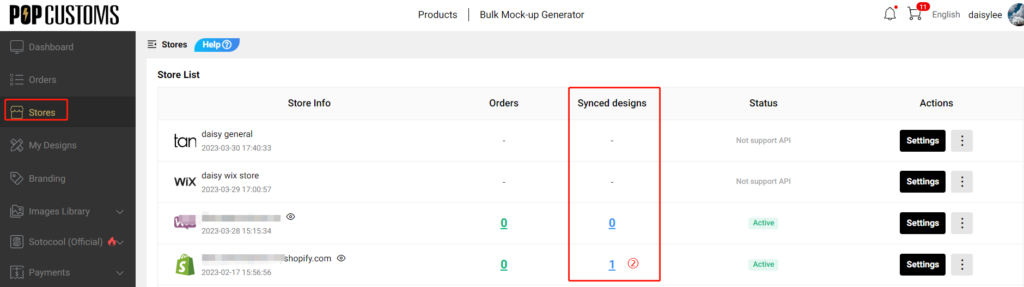
Click + to add the branding materials that you want to ship with this product.


That’s it! After that, all orders for this product synced from this store will be automatically fulfilled and shipped with the added branding materials.
*If you forget to add the branding materials first and the order has been synced to POPCUSTOMS. You can go to Orders->On hold to find this order and add the branding materials there.
二. For orders placed from a shopping cart
② Pick the product that you want to purchase to design, go to My Designs and add it to the shopping cart.


Here you can add the branding materials that you want to ship with your order.

Then click the Place Order button to submit and pay.

*Please noted that the number of branding items will be the same as the number of products.
That’s all.
Q: How to create a shipping profile for POPCUSTOMS products on Etsy?
You can set up calculated shipping on Etsy only when you ship from the US or Canada. However, POPCUSTOMS ships items from China. Under this condition, the calculated shipping settings do not work for our products.
If you choose POPCUSTOMS as one of your suppliers, we suggest you create an exclusive shipping profile for our products. Here is the guide below,
Step 1: Create shipping profile
Step 2: Fill in shipping details
Step 3: Name the profile and save
Step 1: Create shipping profile
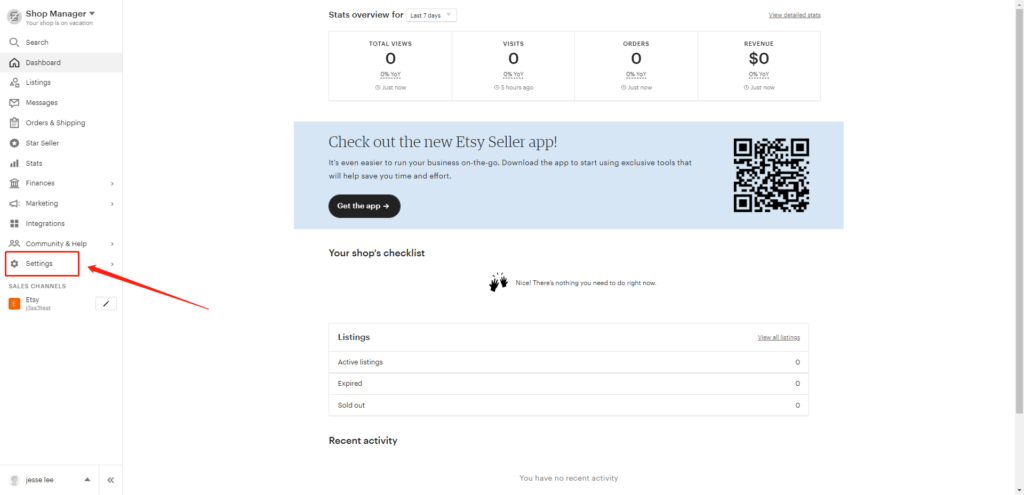
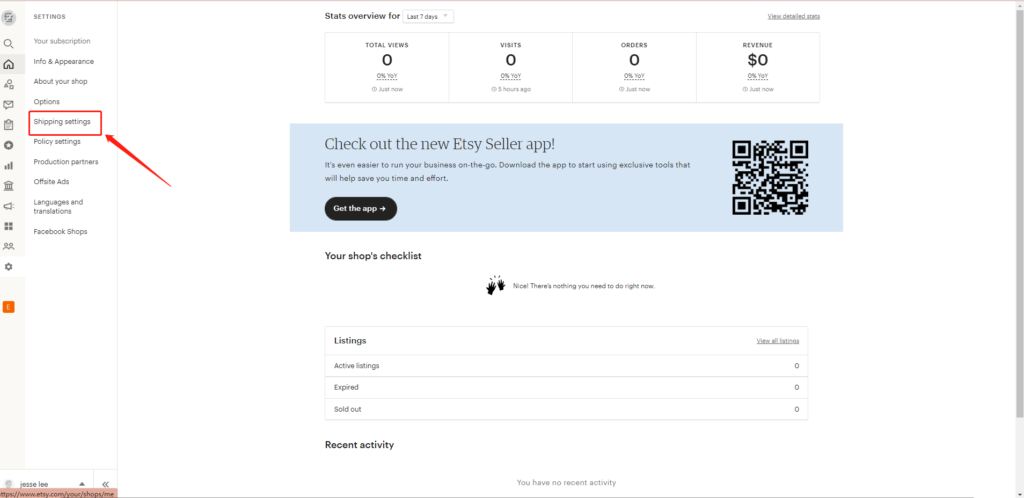
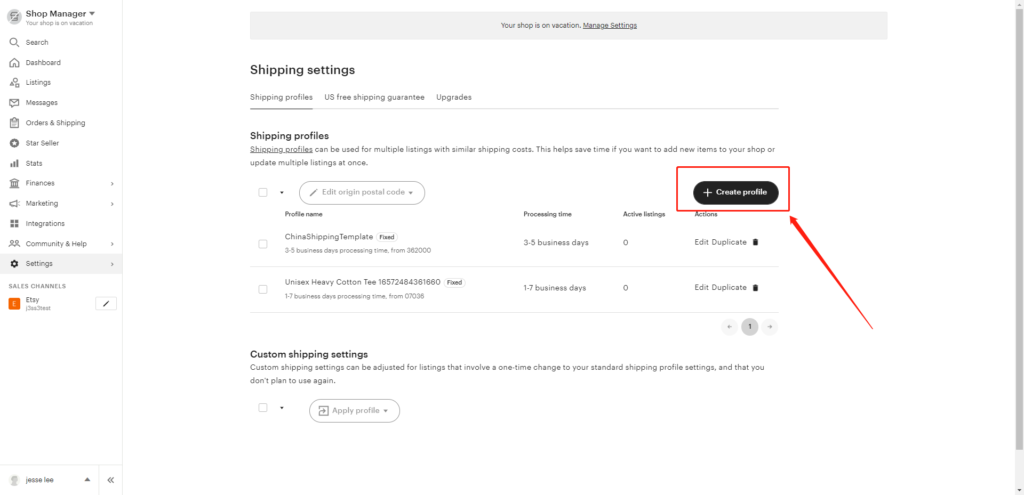
Log in to your Etsy account, go to the Shop Manager -> Settings -> Shipping settings -> Create profile.
Step 2: Fill in shipping details
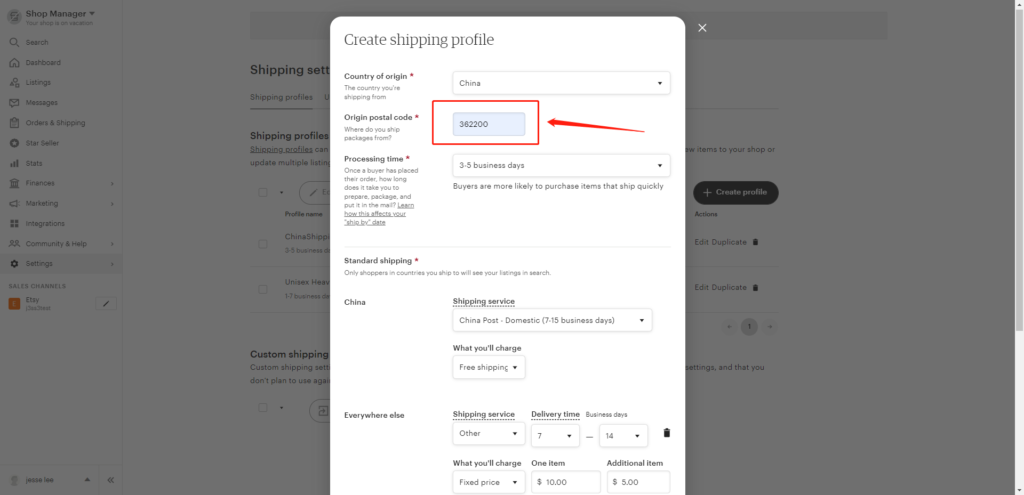
Fill in the requested shipping information, for example,
1- Country of origin: China
2- Original postal code: 362200
3- Processing time: You can find the production time for each product on popcustoms.com
4- Standard shipping: You can provide different Standard shipping options to different destination countries. You can set “Free Shipping” or “$xx for the first item” and “$xx for the additional items”. You can download our shipping fees for reference here https://popcustoms.com/shipping
5- Everywhere else: If you do not find the corresponding shipping services in the options, you can choose Other and enter the delivery time and shipping fees manually.
6- Add a shipping upgrade: You can also add options for shipping upgrades so that the buyers can choose a faster shipping method.
Step 3: Name the profile and save
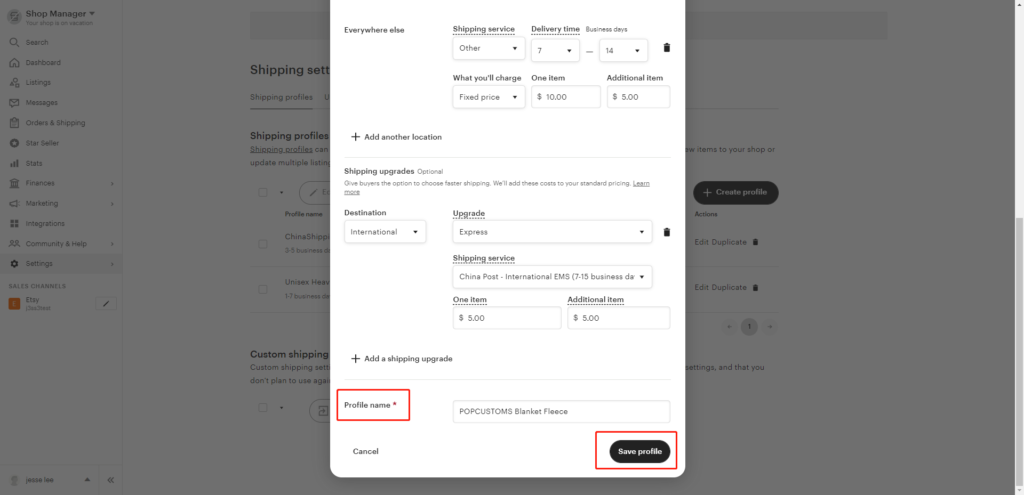
Name this profile properly so you can distinguish it from your other shipping files created for your other suppliers. Save it to use, that’s all.
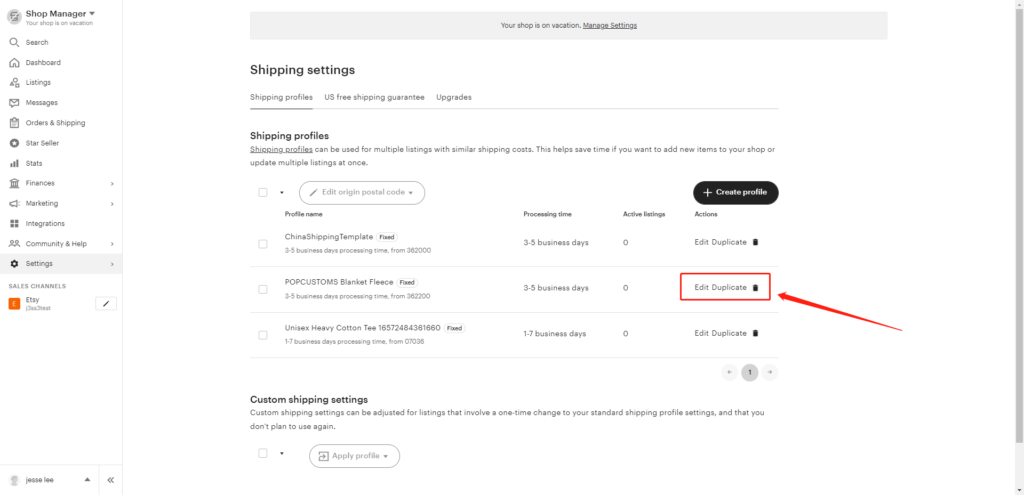
You can find all the shipping profiles you created here, you can edit or duplicate them if needed.
WooCommerce Store Integration Tutorial
Note:
1. Please follow all the steps below to authorize.
2. A platform can only authorize one store. If you want to authorize a new store on the same platform, you need to delete the previously authorized one.
Step 1: Install POPCUSTOMS WordPress plugin
Log in to your WooCommerce account, click Plugins -> Add New, and search POPCUSTOMS to install the plugin.


After installing, click Activate. Then you can find a POPCUSTOMS plugin added in the left column, click it and go to register at POPCUSTOMS.COM.


Then you will be driven to POPCUSTOMS to sign up for a free account or to the Dashboard directly if you have signed up and logged in.
Step 6: Connect your WooCommerce to POPCUSTOMS
① Click Stores -> WooCommerce -> Connect to fill in your WooCommerce store domain and authorize the connection.


② Click the “Approve” button to complete the authorization.

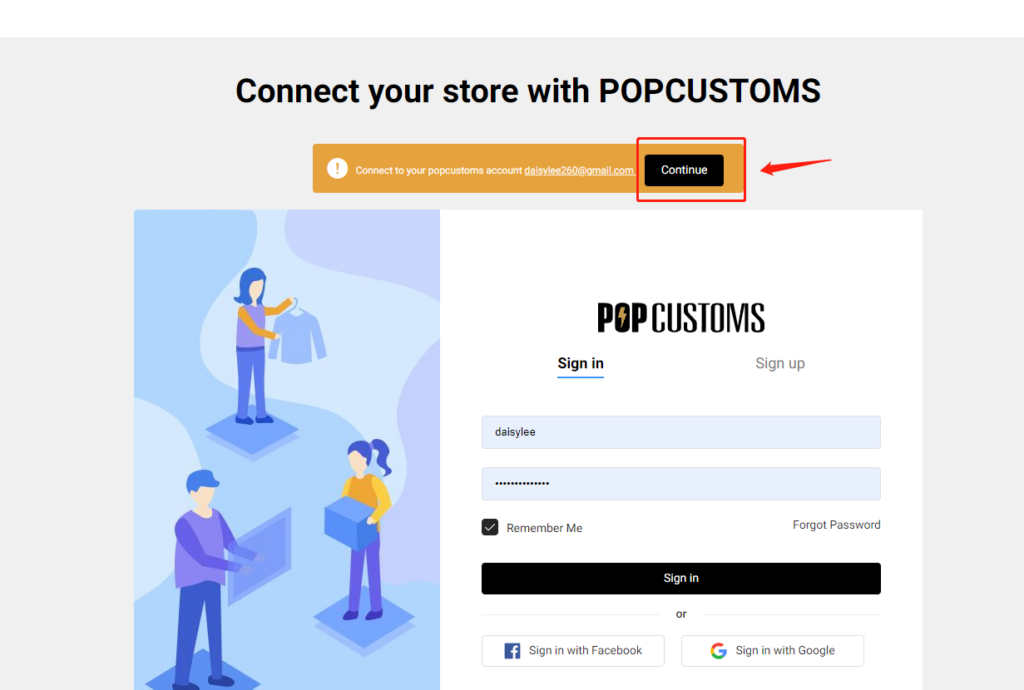
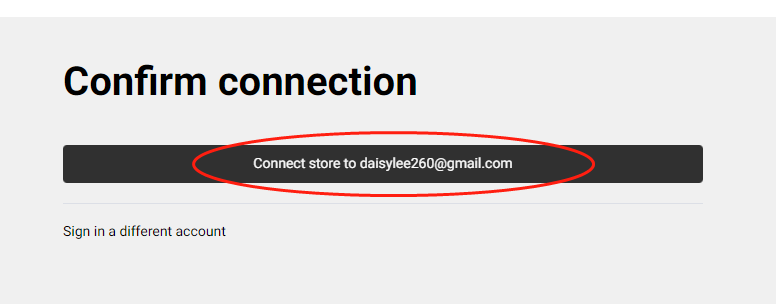
Next step, we suggest you complete the store settings.
That’s all!
Note: Your WooCommerce orders will now be automatically imported into POPCUSTOMS.
📢New Arrival Updates – Jersey Collection for you !
Leave a reply
Hi, Customsers & Artists!
You chance to get more about PopCustoms Products :
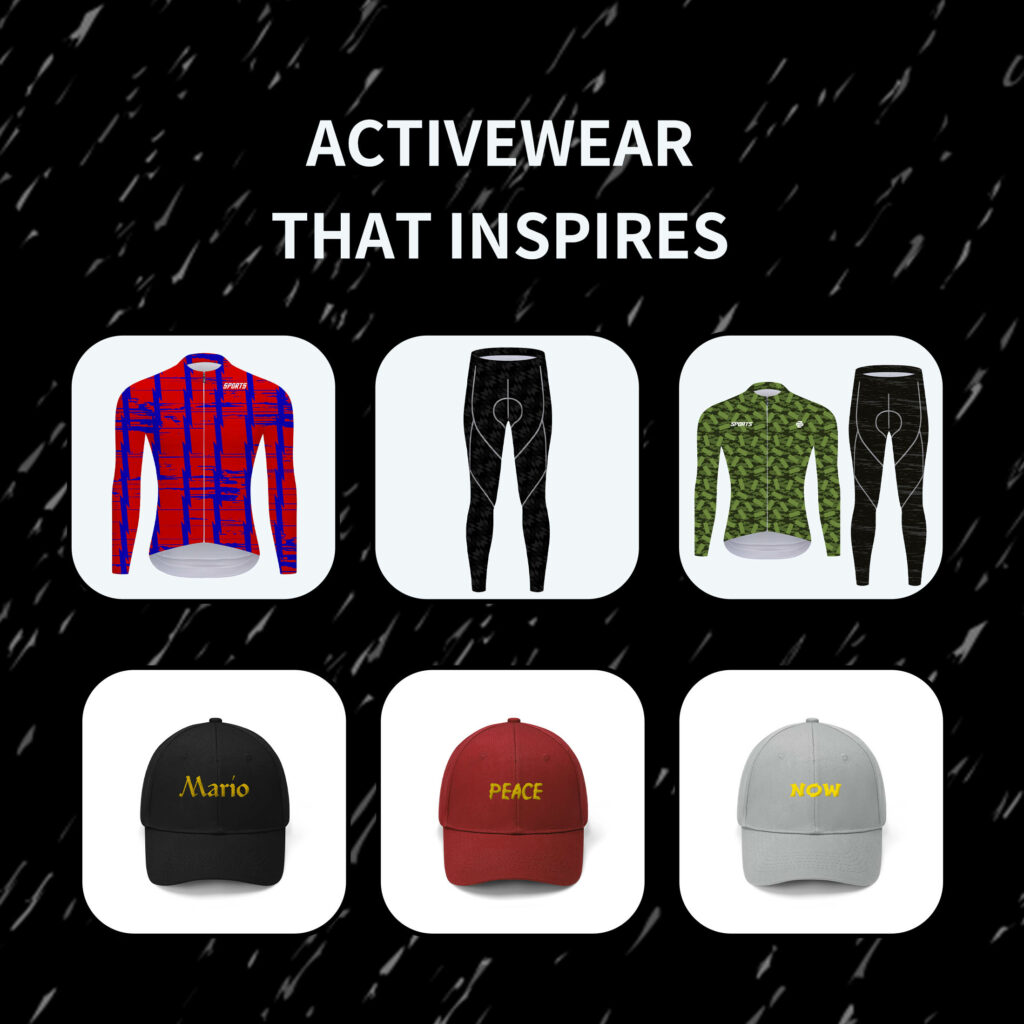
On middle of February , join the our new collection “Cycling Jerseys “Clothing on Popcustoms New Products to growing your ecommercr business , and more.
1: New Elastic Sport Sneakers
Check out : https://popcustoms.com/products?page=2&limit=24&basic_category_id=201
2: Engravable Men’s Timeless Two Stone Ring
Check out : https://popcustoms.com/products/all-jewelry-accessories?page=1&limit=24&basic_category_id=276
3: Men’s Pro Team Long Sleeve Jersey &Training Tights and A Suit Collection
Check out : https://popcustoms.com/products/sport-wear?page=1&limit=24&basic_category_id=316
BigCommerce Store Integration Tutorial
Note:
1. Please follow all the steps below to authorize.
2. A platform can only authorize one store. If you want to authorize a new store on the same platform, you need to delete the previously authorized store.
Step 1: Sign up for a free account on POPCUSTOMS
Click the Sign up button in the right upper corner to create a free account on POPCUSTOMS.
Step 2: Install the POPCUSTOMS app on BigCommerce
① Click the link below to install our app
https://www.bigcommerce.com/apps/popcustoms/
② Log in to your BigCommerce account
③ Click “Install”.

④ Click “Confirm“.

Step 3: Connect your store
After you install the app, you’ll be asked to log into POPCUSTOMS accounts. Click Sign in then you will be taken to a new page to confirm the connection between your BigCommerce store and POPCUTOMS. Just click it to complete the connection.

Step 4: Add products to your store
Now you can click Products on the Dashboard page to design and add products to your store with just a few clicks. Start now to add your first product!
Step 5: Complete the Store settings after connection, including
一. Basic settings
二. Sync settings: ① Currency; ② Estimated profit rate; ③ Product status
三. Shipping settings
四. Billing method settings
Click this guide to check.
That’s all!
Note: Your BigCommerce orders will now be automatically imported into POPCUSTOMS.
📢2023 Updates with Freshly products for you !
Hi, Customsers & Artists!
A lot of new products has happened on Popcustoms.
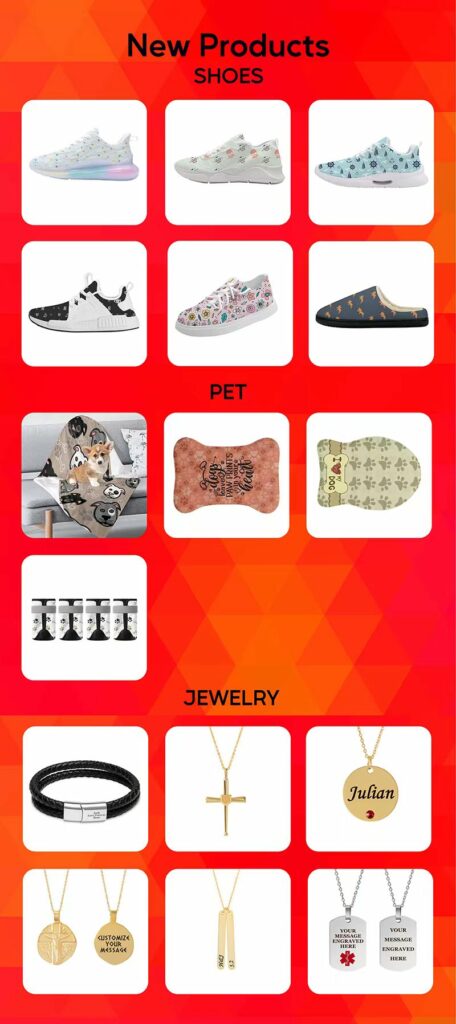
Since then we’ve added a bunch of new products that might interest you, so you’ll surely find something that makes you go wow! How about the products below?
1: New Tech Runing Shoes / Sporty Sneakers
Check out : https://popcustoms.com/products/All-Footwear?page=1&limit=24&basic_category_id=200
2: Personalized and cute pet products for pets love
Check out :https://popcustoms.com/products/All-Pet-Products?page=1&limit=24&basic_category_id=296
3: Personalization Jewelry Necklaces and Bracelet for lover friends
Check out : https://popcustoms.com/products/All-Jewelry-Accessories?page=1&limit=24&basic_category_id=276
Enjoy !
Stay in touch!
business@popcustoms.com
POPCUSTOMSTEAM
😱Notice of Production & Shipment in the Chinese New Year !
Dear POPCUSTOMS family,
Since the Chinese New Year is coming from Jan 20th -Jan 26th, and inform you about the holiday timeframe with order production time and delivery time, please note and confirm with yourself or your customers :
1:Our Popcustomsteam will work as normal, so you can contact us for any needs or INQ during that time.
2: However, the order from Jan 14th-Jan 26th will be delayed for A few days according to our vacation , and we’ve marked the “Countdown time ” on the template of each product, you can check it yourself.
We guarantee expedited production and shipment when we back.
Please don’t be hesitant to message us online or contact us by email: business@popcustoms.com or call us by “May -what’sapp :+86 15905998229”.
Thank you! Have a nice day !
Popcustomsteam